

Your telemetry volume is rising. Your Splunk bill is rising faster.
If this sounds familiar, you’re not alone.
As enterprises scale cloud workloads, microservices, and security instrumentation, Splunk’s pricing complexity has continued to grow under Cisco, with multiple licensing tiers — ingest-based, workload-based, and entity-based — creating ongoing budget uncertainty for customers. Meanwhile, teams are sending more logs, metrics, and traces than ever before. The result? Cost overrun, surprise invoices, and tough decisions about what telemetry you can afford to keep.
But there’s a better way: optimizing your Splunk footprint before data ever reaches the platform.
That’s exactly what Apica Flow was built for.

The Core Problem: You’re Paying Splunk for Data Ingestion You Don’t Need
Most Splunk cost pain comes down to:
1. Too much data is ingested
Developers turn on verbose logging; security adds more instrumentation; every new microservice emits new data streams. Before long, you’re ingesting everything.
2. Splunk’s pricing model punishes unoptimized data, regardless of license type
Whether you’re on ingest-based, workload-based, or entity pricing, the economics are the same: more unfiltered data means more compute, more storage, and higher costs. Under Splunk’s workload model, which measures compute capacity consumed during search and analytics, every noisy log and redundant event burns through your licensed capacity. Flow intercepts data before it reaches Splunk, reducing what gets indexed and processed, which lowers costs across all pricing models.
Even with workload‑based pricing, more data = more indexers, more storage, more compute.
3. You’re sending raw, unfiltered telemetry straight into Splunk
Anything unnecessary—debug logs, duplicate data, redundant fields—costs money.
4. You lack a centralized control plane for telemetry
Different teams ship data independently, with no unified governance.
Apica Flow solves all four.
How Apica Flow Cuts Splunk Costs by up to 40%
Apica Flow is an intelligent telemetry pipeline that reshapes, reduces, routes, and refines your observability data—before it ever hits Splunk.
Here’s how it saves money immediately and ongoing:
1. Intelligent Data Reduction (Without Losing Signal)
Flow processes data at the pipeline layer, before data reaches its destination and applies precision filtering:
- Remove duplicate or redundant log lines
- Drop noisy event patterns
- Exclude rarely used fields
- Downsample high‑volume metrics
- Apply dynamic filtering rules for peak traffic windows
You send only the data that matters—not everything your systems can produce.
This alone can reduce Splunk ingest by 25–60% depending on your environment.
2. Transform Raw Logs into Cleaner, Cheaper Formats
Splunk charges significantly for heavy, verbose logs. Flow transforms them:
- Normalize logs into compact, structured formats
- Extract only meaningful fields
- Enrich data at the pipeline, eliminating downstream processing
- Convert multi‑KB log entries into lightweight, structured events
Cleaner data = smaller ingest footprints = lower Splunk bills.
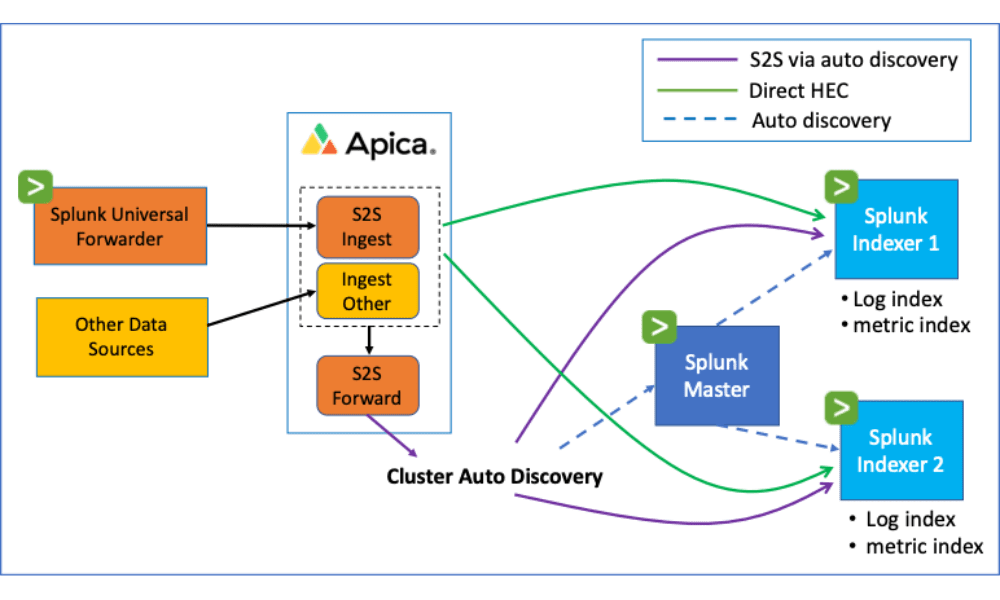
3. Route Non‑Critical Data to Cheaper Storage
Not all telemetry needs to land in Splunk.
Flow lets you route data intelligently:
- High‑value security and application logs → Splunk
- Low‑value logs → object storage like S3 or OCI
- Debug or verbose logs → cheaper observability tools
- AI/ML telemetry → your data lake or vector database
Splunk becomes a premium destination for only the data that deserves it.
4. Eliminate Agent Sprawl and Shadow Telemetry
When different teams send logs independently, Splunk ingest balloons.
Flow solves this by acting as a central control plane:
- Unified pipeline for logs, metrics, and traces
- Standardized configurations
- Organization‑wide data governance
- Enforcement of retention + routing policies
This prevents accidental ingest bloat—one of the top causes of Splunk overages.
5. Full OpenTelemetry Support Future‑Proofs Your Stack
Instead of relying on proprietary Splunk agents, Flow embraces OpenTelemetry, letting you:
- Standardize instrumentation across environments
- Avoid vendor lock‑in
- Reuse telemetry for multiple backends
- Migrate or offload Splunk workloads over time
You gain more flexibility and significantly lower long‑term cost exposure.
What This Looks Like in Practice
Before Apica Flow
- Splunk invoice growing 25–40% annually
- Teams ingesting everything “just in case”
- No visibility into data volume drivers
- Massive noise in logs, hard to detect real issues
- Duplicate ingest across multiple observability tools
After Apica Flow
- Up to 40% reduction in Splunk ingest
- Predictable spending with guardrails
- Unified view of all telemetry dataflows
- Better-quality logs with less noise
- Freedom to route telemetry anywhere—not just Splunk
Why This Matters in 2026
Splunk’s ecosystem has become more complex and more expensive as organizations move toward AI‑driven security and observability workloads.
At the same time:
- Data volumes are increasing exponentially
- Teams need real-time insights without paying for unnecessary storage
- AI observability models require clean, structured, enriched data
- Compliance requirements demand precise data documentation
Apica Flow is the bridge between runaway telemetry growth and sustainable Splunk usage.
It gives you control over your data, cost, and architecture—without compromising visibility, security, or reliability.
A Modern Telemetry Strategy: Splunk + Flow, Not Splunk Alone
Flow doesn’t replace Splunk.
It supercharges it.
You get:
- Better signal-to-noise ratio
- Lower ingestion and storage costs
- More flexible workflows
- Faster search performance
- Cleaner, more structured data
- A future-proofed observability strategy rooted in open standards
If you’re looking to cut Splunk costs without losing observability quality, Flow is the most efficient way to do it.
Ready to See Your Savings?
We can model your Splunk cost reduction in minutes.
- Avg daily ingest volume
- Storage retention period
- Types of data sources
- Current Splunk licensing model
We’ll calculate your estimated savings and create a tailored optimization plan.


